Microsoft SC200 Certification - Microsoft Endpoint & eXtended Detection Response (EDR/XDR) Part 2C - Microsoft Defender for Office (MDO)
Microsoft Defender for Office365 (MDO)
Think of MDO as your email security gateway, constantly scanning emails to defend against phishing, malware, and spoofing attempts. Here's how it works:
Analyzing Email Sources: Evaluates the origin of emails, checking against databases of known malicious senders and infrastructure.
Verifying Sender Authenticity: Confirms whether the sender's identity, brand, and domain are legitimate. For external domains, spoof intelligence ensures proper implementation of SPF, DKIM, and DMARC standards to prevent spoofing.
Detecting Email Spoofing: Learns typical sending patterns from domains to identify spoofed messages effectively.
Impersonation Protection: Protects high-profile users through mailbox intelligence, using machine learning to build a contact graph of their usual interactions. This identifies anomalies that may signal impersonation attempts targeting trusted individuals within your organization.
Attachment and Link Analysis: Examines email attachments and links by launching them in a sandbox environment where machine learning models analyze for malicious signals.
Post-Delivery Protection: Continuously scans delivered emails for threats over several days, leveraging updated threat intelligence to detect newly discovered malware or phishing attempts. The Zero-hour Auto Purge (ZAP) feature retroactively removes malicious content from mailboxes, quarantining threats as they are identified.
Safe attachments - Opens attachments in sandbox.
In addition to this, MDO offers several valuable features:
User-Friendly Reporting Tools: Provides an intuitive interface for users to report suspicious emails as phishing.
Explorer Interface: A powerful tool to search and remediate emails across the system. For instance, if phishing emails from a compromised legitimate partner organization are discovered in your environment, this interface allows administrators to quickly locate and purge those emails from all mailboxes before users interact with them.
Attack Simulation Training: Enables organizations to conduct phishing training exercises to educate users and reduce susceptibility to real-world attacks. Creating dynamic Groups for Attack Simulation Training: https://techcommunity.microsoft.com/blog/microsoftdefenderforoffice365blog/create-targeted-attack-simulation-training-campaigns-with-dynamic-groups/4287637?utm_source=substack&utm_medium=email
Business Email Compromise (BEC)
A critical capability of any modern email security platform is the detection and prevention of Business Email Compromise (BEC), particularly Adversary-in-the-Middle (AiTM) attack variants, which have significantly impacted organizations in recent years. BEC defenses are closely integrated with identity protection because these attacks typically begin with phishing that compromises a user’s credentials. Once the identity is compromised, the threat actor authenticates as the legitimate user and leverages that access to conduct follow-on activities such as fraudulent email conversations, payment redirection, or privilege abuse.

Common Session IDs and Linkable Tokens
Microsoft has strengthened identity telemetry by introducing a common Session ID for authentication events. A Session ID is generated during the initial user authentication and is embedded in all subsequent authentication tokens used to access workloads from the same device. These workloads log both the User ID and the Session ID, enabling precise correlation of activity back to a single authentication session. This capability significantly improves the ability to attribute actions, trace attacker behavior, and investigate identity-based attacks across Microsoft services.
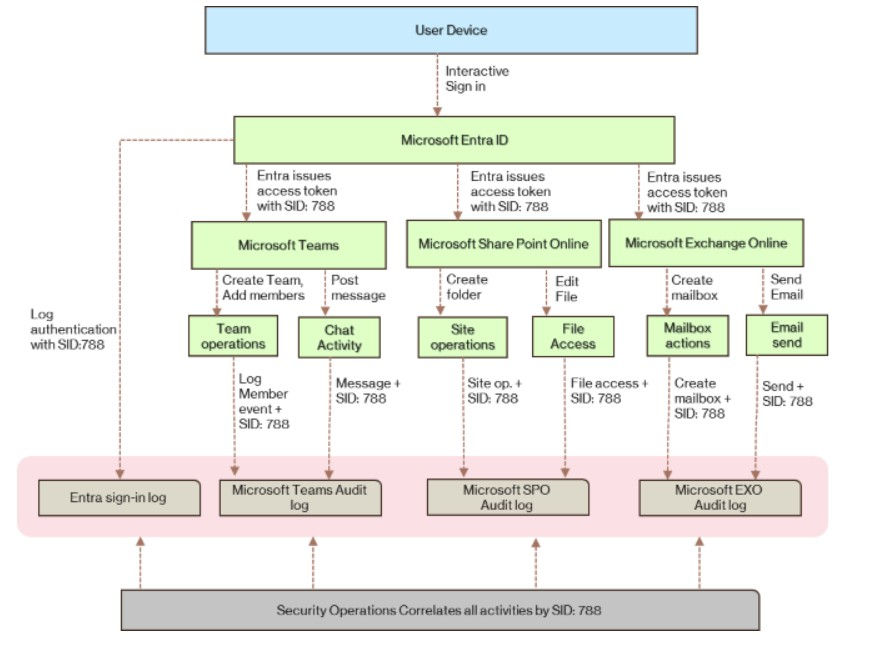
More information about Business Email compromise scan be found here: Adversary-in-the-Middle (AiTM) and Business Email Compromise (BEC)
MDO Review Questions
Identity protections
Email protections safe links/safe attachments
Three versions of MDO:
EOP Exchange Online Protection
Defender for Office 365 P1 - protects email and collab from zero day and BEC
Defender for Office 365 P2 - Adds post breach investigation, automation, and simulation
Question 1
You enable Safe Attachments in Microsoft Defender for Office 365. Users report noticeable delays in email delivery. You must reduce delivery time without reducing attachment scanning security. What should you configure?
A. Disable Safe Attachments for internal senders
B. Enable Dynamic Delivery
C. Use Enhanced Filtering
D. Configure a SecOps mailbox
Correct Answer: B
Rationale: Dynamic Delivery allows the email body to be delivered while attachments are scanned in the background.
Question 2
Your organization uses Exchange Online and Microsoft Defender for Office 365. You need to verify whether Zero-hour Auto Purge (ZAP) removed a malicious message from a user’s mailbox. Which report should you review?
A. Mail flow report
B. Quarantine report
C. Threat protection status report
D. Secure Score report
Correct Answer: C
Rationale: The Threat protection status report shows ZAP actions and post-delivery remediation.
Question 3
What is the primary purpose of a SecOps mailbox in Microsoft Defender for Office 365?
A. To quarantine all high-confidence phishing emails
B. To receive copies of emails blocked by Safe Attachments
C. To collect unfiltered email messages for security analysis
D. To automatically remediate compromised mailboxes
Correct Answer: C
Rationale: SecOps mailboxes receive unfiltered messages; EOP and MDO do not apply filtering actions.
Question 4
Which Defender for Office 365 feature allows administrators to control what users can do with quarantined messages based on why they were quarantined?
A. Tenant Allow/Block List
B. Anti-phishing policies
C. Quarantine policies
D. Safe Attachments policies
Correct Answer: C
Rationale: Quarantine policies define user and admin permissions for quarantined messages.
Question 5
Your organization uses a third-party email gateway in front of Microsoft 365. You need Microsoft Defender for Office 365 to see the original sender IP address. What should you configure?
A. Mail flow rules
B. Enhanced Filtering
C. Dynamic Delivery
D. A SecOps mailbox
Correct Answer: B
Rationale: Enhanced Filtering preserves original sender IP and header information.
Question 6
You need to manually override Microsoft 365 filtering verdicts for incoming email messages from a specific sender. Which feature should you use?
A. Anti-spam policies
B. Anti-phishing policies
C. Tenant Allow/Block List
D. Quarantine policies
Correct Answer: C
Rationale: The Tenant Allow/Block List allows explicit allow or block decisions during mail flow.
Question 7
You have a Microsoft 365 E5 subscription. You need to prevent a user from sending more than 20 email messages per day. What should you configure?
A. Anti-phishing policy
B. Safe Attachments policy
C. Outbound anti-spam policy
D. Tenant Allow/Block List
Correct Answer: C
Rationale: Outbound anti-spam policies support per-user daily message limits.
Question 8
Which policy in Microsoft Defender for Office 365 is specifically designed to protect users from impersonation and spoofing attacks?
A. Anti-spam policy
B. Anti-phishing policy
C. Safe Attachments policy
D. Safe Links policy
Correct Answer: B
Rationale: Anti-phishing policies provide spoof protection and mailbox intelligence.
Question 9
You want to receive a copy of messages analyzed by Safe Attachments in an administrator mailbox for review. What should you configure?
A. Enable ZAP and configure a quarantine policy
B. Enable Monitor mode and redirect email to an admin mailbox
C. Create a SecOps mailbox and apply an anti-spam policy
D. Add the admin to the Tenant Allow/Block List
Correct Answer: B
Rationale: Monitor mode with redirect allows administrators to track Safe Attachments detections.
Question 10
Why can Safe Attachments delay email delivery, and how does Dynamic Delivery address this?
A. Attachments are blocked; Dynamic Delivery bypasses scanning
B. Attachments are detonated; Dynamic Delivery delivers the message body first
C. Emails are quarantined; Dynamic Delivery releases them automatically
D. Emails are filtered by EOP; Dynamic Delivery disables EOP
Correct Answer: B
Rationale: Safe Attachments detonation causes delay; Dynamic Delivery delivers the message while analysis completes.
References
Strengthen identity threat detection and response with linkable token identifiers:

Comments